
Using AI to Enrich Web Shop Items in Business Central
If you have ever imported a product catalogue from a distributor feed into Business Central, you know the result. Item names like CPU Cooler Gamdias Boreas RGB M1-610 (1700/2011/1200/AM4/AM5) TDP 180W. Descriptions copied from three different vendors in three different styles. Ten pictures per item, four of them the same render, one of them the box, one of them a logo. Net weight zero, gross weight zero. And a web shop that has to sell all of that.
Now multiply it by 60,000 items.
That is the situation I was in on a recent project: a retailer selling IT equipment from about 20 distributor feeds, all landing in one BC tenant, all published to a web shop. Nobody is going to fix 60,000 product pages by hand. So we taught AI to do it, and we built it so that Business Central stays the single source of truth for every word and every picture that reaches the shop.
This post is about how that works: how the AI connects to BC, what it actually does to an item, how the result gets to the web shop, and what it helps with.
The big picture
There are three moving parts:
- A vendor integration extension - pulls the distributor feeds into BC (items, attributes, picture URLs, category mappings) and exposes the catalogue through custom API pages and a web service codeunit.
- An AI agent (Claude in our case) that reads the catalogue through a small command-line tool, researches each product, looks at the pictures, and writes its decisions back.
- A web shop connector extension - takes the enriched item, builds a per-channel product payload, and pushes it to the web shop.
flowchart LR
  V["Distributor feeds<br/>(about 20 vendors)"] -->|"vendor import job"| I

  subgraph BC["Business Central"]
    I["Items, attributes,<br/>pictures, marketing text"]
    API["Read-only<br/>custom API pages"]
    ACT["Web service codeunit<br/>(OData unbound actions)"]
    WS["Web shop connector<br/>change capture, outbox, projection"]
  end

  I --> API
  API -->|"GET, OAuth2"| CLI["Python CLI"]
  CLI <-->|"JSON files"| AI["Claude agent"]
  CLI -->|"POST, OAuth2"| ACT
  ACT -->|"writes"| I
  I --> WS
  WS -->|"HMAC-signed push"| SHOP["Web shop"]
The important thing in that diagram is the direction of the arrows. Business Central never calls the AI. The AI calls Business Central.
Claude drives, BC exposes
This was a deliberate change. The previous generation of this integration (an older WooCommerce connector) did it the other way around: an AL codeunit built a prompt, called an AI service over HTTP, parsed the answer and wrote it into the item. That works for one item from a button on the Item Card. It does not work for 60,000 items, for a few reasons:
- AL is a bad place to run a long, research-heavy, multi-step conversation with a model. Every call is a blocking HTTP request inside a session with timeouts.
- The model only sees what AL put in the prompt. It cannot go and look at the manufacturer page, and it certainly cannot look at the pictures.
- Every change to the prompt is a new app version.
So the design principle for the new version was simple: "Claude drives, BC exposes."
flowchart TB
  subgraph OLD["Before: BC calls the AI"]
    direction LR
    O1["Item Card action"] --> O2["AL builds prompt"] --> O3["HTTP call to AI service"] --> O4["AL parses answer<br/>and writes item"]
  end

  subgraph NEW["Now: the AI calls BC"]
    direction LR
    N1["Agent reads catalogue<br/>through API pages"] --> N2["Agent researches,<br/>views pictures, decides"] --> N3["Validated decisions<br/>posted to BC actions"] --> N4["AL applies and<br/>records the result"]
  end
BC's job becomes small and boring, which is exactly what you want from an ERP: expose clean data, accept well-formed changes, validate them, and store them. All the intelligence lives outside, where it can be changed without deploying anything.
How the AI actually connects to BC
Authentication
Nothing exotic. It is a standard service-to-service (client credentials) OAuth2 flow against Entra ID, using the normal Business Central scope:
TOKEN_URL = "https://login.microsoftonline.com/%s/oauth2/v2.0/token"
SCOPE = "https://api.businesscentral.dynamics.com/.default"
BASE = "https://api.businesscentral.dynamics.com/v2.0/%s"
API_ROUTE = "api/<publisher>/<group>/v1.0"
The tool reads five values from a .env file (tenant, client ID, client secret, environment, company ID), refreshes the token 60 seconds before it expires, and retries reads on 429 and 5xx while honouring Retry-After.
Warning
Writes are never retried automatically. A POST that timed out may already have committed in BC, and replaying it blindly is how you end up with duplicate attribute values. The tool reports it, and a human decides.
Tip
Keep that
.envout of source control. Add it to.gitignorebefore you create it, and if a secret ever does get committed, rotate it in Entra. Removing it from the repo does not remove it from history.
Reading: custom API pages
The read side is a set of read-only API pages (Editable = false, under a custom publisher and API group). Each one is a flat, agent-friendly view of one piece of the catalogue:
| API page | What the agent gets |
|---|---|
| Items | number, display name, item category, gross and net weight |
| Item web data | slug, web shop flag, AI enriched flag, meta title, meta description |
| Item pictures | item number, URL, display order, excluded flag, vendor |
| Attributes | the BC attribute vocabulary |
| Attribute values | the BC value vocabulary |
| Attribute assignments | which item has which value |
| Attribute filters | filter mode for storefront facets |
| Vendor mappings | raw vendor categories, attributes and values waiting to be mapped |
Read-only matters. The agent can never PATCH an item through these pages, which means every change has to go through the one door that validates it.
Writing: one codeunit, many actions
That door is a single public codeunit. It is registered as a tenant web service on install, so every public procedure becomes an ODataV4 unbound action:
POST /v2.0/{environment}/ODataV4/{WebServiceName}_ApplyEnrichment?company={id}
Content-Type: application/json

{ "payload": "[ { \"itemNo\": \"...\", \"product_name\": \"...\", ... } ]" }
Every action takes a JSON array as text and returns a JSON array as text, with a per-row ok/error result. One bad row does not roll back the other 49.
The actions cover the whole curation job: mapping vendor categories, attributes and values to the BC vocabulary, merging duplicate attribute values, curating pictures, rewriting copy, setting the web shop flag, setting filter modes, and the big one, applying a full item enrichment.
The CLI in the middle: pending, decide, apply
Between the agent and BC sits a small Python tool. Standard library only, no packages to install. I want to be clear about one thing because people ask: the CLI does not run an AI model. It does not call OpenAI, Anthropic or Azure OpenAI. It only moves data and validates it. The agent (Claude, running in Claude Code or similar) does the thinking.
Every workflow follows the same three steps:
sequenceDiagram
  autonumber
  participant A as Claude agent
  participant C as CLI
  participant B as Business Central

  A->>C: enrich pending --limit 5
  C->>B: GET items, item web data,<br/>pictures, attributes...
  B-->>C: item facts, BC vocabulary, picture URLs
  C-->>A: pending.json (facts + instructions)

  Note over A: Research the exact model,<br/>open every picture,<br/>write decisions.json

  A->>C: enrich apply decisions.json --dry-run
  C->>B: GET live pictures (stale check)
  C-->>A: validation report

  A->>C: enrich apply decisions.json
  loop for each item
    C->>B: POST ApplyPictureDecisions
    C->>B: POST ApplyEnrichment
    B-->>C: per-row ok / error
  end
  C-->>A: results.json
The pending file is self-contained. It carries the facts for each item, the BC vocabulary to choose from, and the instructions themselves (content rules and picture rules). So the prompt lives in one place in the tool's source, it is versioned in git, and the agent gets exactly the rules that apply to that workflow.
Commands are shaped like tools: one per job (category mapping, attribute mapping, value mapping, enrichment, copy repair, value merging), plus a health check and a backlog status. Wrapping them as an MCP server later is a thin layer on top. We chose a CLI first because the expensive part, the model's reasoning, costs the same either way, and a CLI is a lot less to maintain.
What the AI actually does to an item
One enrichment decision covers everything about an item at once. The rule in the agent instructions is blunt: one completed item must contain all content, SEO, weight, attribute and gallery decisions together. Never submit a partial item.
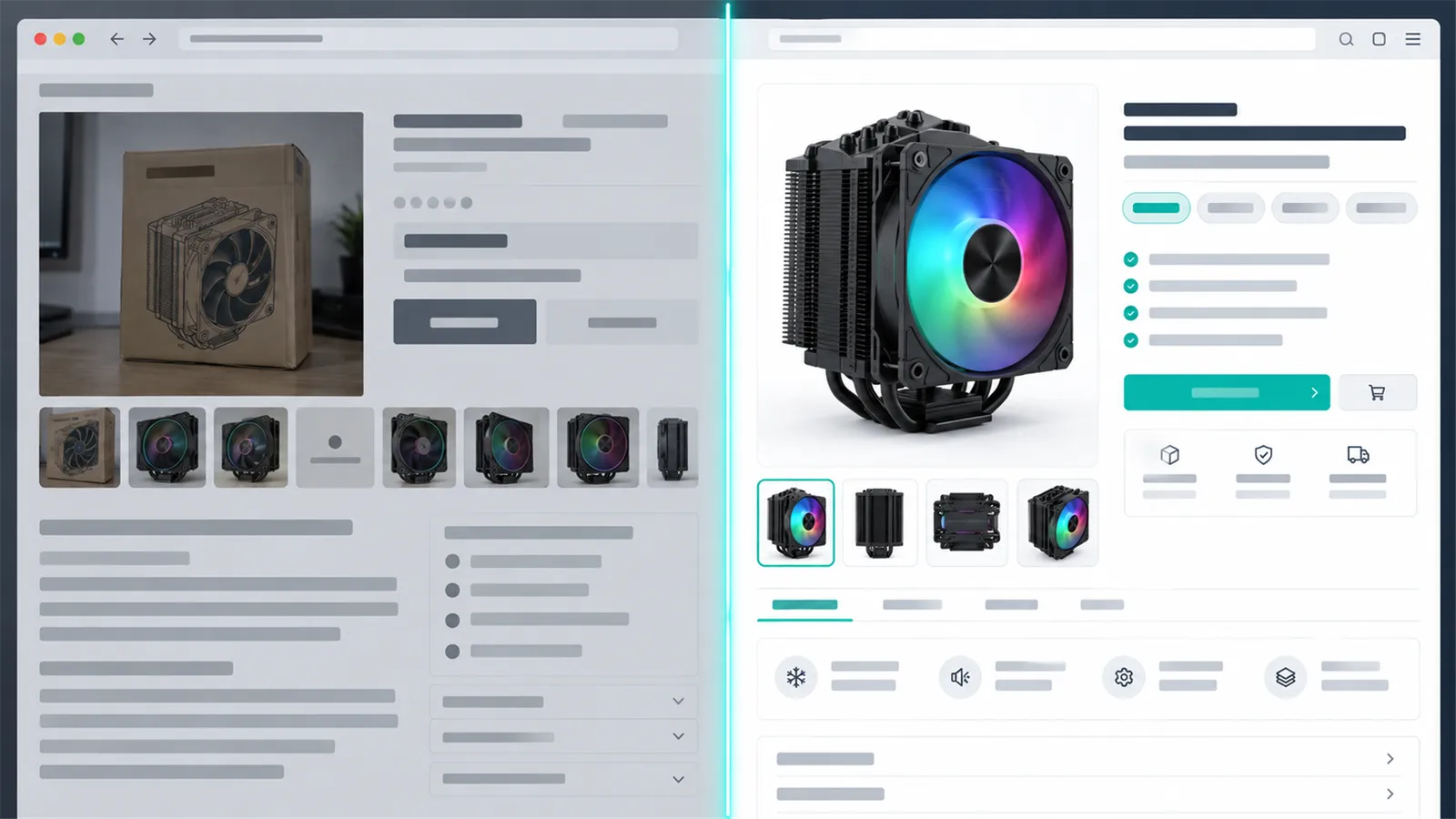
Same product, same BC item. On the left, what the distributor feed gave us. On the right, what the shop shows after one enrichment pass.
flowchart LR
  E["ApplyEnrichment"] --> N["Item.Description<br/>(clean product name)"]
  E --> W["Item Net / Gross Weight"]
  E --> M["Entity Text<br/>(Marketing Text scenario)"]
  E --> S["Item web data<br/>meta title, meta description,<br/>AI enriched = true"]
  E --> AT["Item Attribute Value Mapping<br/>(find or create, filter flag)"]
  E --> G{"Both weights<br/>known?"}
  G -->|yes| WS["Web shop flag = true"]
  P["ApplyPictureDecisions"] --> PO["Item pictures<br/>order 1..6, excluded"]
1. Product name
Distributor names are written for purchasing departments, not shoppers. The rule is: brand + model + key variant + product type + one spec that helps the buyer compare, in natural Serbian.
Wrong
CPU Cooler Gamdias Boreas RGB M1-610 (1700/2011/1200/AM4/AM5) TDP 180W
Correct
Gamdias Boreas M1-610 RGB CPU hladnjak 180W TDP
The socket list did not disappear. It moved into the technical characteristics and the attributes, where it belongs and where the shop can filter on it. Marketing adjectives ("amazing", "ultimate") are banned in names.
2. Marketing text
The description is a fixed HTML structure with four sections, always in the same order:
- Opis proizvoda (product description)
- Tehničke karakteristike (technical characteristics)
- Prednosti (advantages)
- Zašto izabrati baš ovaj model? (why this exact model?)
It ends with a visible line of 3 to 6 SEO keywords. The most important rule is about facts: base claims on supplied specifications, resolved attributes or an actually consulted source for the exact model and variant. Existing vendor text is treated as a draft, not as proof. If a fact cannot be confirmed, it is left out. A short accurate description beats a long invented one.
A nice side effect: the text is stored in BC's standard Entity Text table with the Marketing Text scenario. That is the same storage BC's own Copilot marketing-text feature uses, so the content shows up in the standard place, not in some custom blob field.
3. SEO fields
Meta title around 60 characters, meta description around 160, both stored on the item's web data record and published straight to the shop. These are also visible and editable on the Item Card, in a new web shop group.
4. Weights
This one surprised me with how much it mattered. Half of the vendor feeds send zero weight. Zero weight means the shop cannot calculate shipping, and in our setup an item without both weights simply does not get published.
So the agent must research weights, and when it cannot confirm one, estimate it down a fixed ladder: manufacturer data, then packaging data, then the pictures, then comparable products. Gross must be greater than or equal to net. Estimates never appear in the shopper-facing text. The reasoning goes into a review summary (at least 80 characters) that the tool checks and then strips before sending to BC.
5. Attributes and filters
The agent reviews the item's attributes, creates missing ones against the existing BC vocabulary, and marks the ones useful for comparison as filters. Each time an attribute is used as a filter its evidence counter goes up, and the storefront uses that (plus a manual Auto / Always / Never override) to decide which facets to show in a category.
6. Picture gallery
This is where a vision-capable model earns its money. The agent opens every picture from every vendor, including ones previously excluded, and returns exactly one status per picture: position N or delete.

One hero, five distinct angles. Duplicates, the box, the logo, the spec sheet and the wrong model are excluded, not deleted.
- Position 1 is the hero: the exact product, sharp, recognisable at thumbnail size.
- Duplicates across vendors are removed, keeping the sharpest copy.
- Logos, spec sheets, accessories alone and wrong models are removed.
- At most 6 pictures are kept.
delete does not delete anything. It marks the picture as excluded and clears its order, which leaves a tombstone so that the next vendor sync does not bring the same picture back.
From enriched item to web shop
Enrichment only writes to BC. Getting it to the shop is the web shop connector's job, and it does not care whether a human or an AI made the change.
flowchart TB
  CH["Change on Item, item web data,<br/>pictures, attributes,<br/>price list lines..."] -->|"event subscribers"| OB["Outbox table<br/>(one row per channel, item, type)"]
  OB --> SEL{"Channel selection<br/>web shop flag,<br/>include/exclude rules,<br/>weight gate"}
  SEL -->|"in"| R2["Pictures copied to<br/>object storage (CDN)"]
  R2 --> PR["Projection<br/>builds payload + SHA-256 hash"]
  PR --> H{"Hash same as<br/>last accepted?"}
  H -->|"yes"| NC["Marked no change"]
  H -->|"no"| PUSH["POST {ingest URL}/products<br/>X-Signature: HMAC-SHA256"]
  PUSH -->|"2xx"| OK["Hash stored,<br/>channel item = published"]
  SEL -->|"out"| T["published: false tombstone"]
A few details worth calling out:
- Change capture is cheap. Event subscribers only enqueue an outbox row. They never build the payload and never compare
xRec. The heavy lifting happens later, in a job queue entry. - One item, many shops. A channel is one site, with its own selection rules (by item category, vendor, brand or item filter, last match wins), pricing, VAT and shipping setup.
- The hash is the brain. The projection is hashed, and the hash is stored only after the shop answers 2xx. Re-enqueue the whole catalogue nightly and only items that really changed get sent.
- Pictures first. A new product is held back until its whole gallery is uploaded, so the shop never shows a product with a broken image.
- One way only. The shop never calls BC for catalogue data. The only traffic back is orders and order status, through a separate set of actions.
The payload the shop receives is the result of everything the AI did: name, slug, description (the marketing HTML), metaTitle, metaDescription, categoryPath, brand, grossWeight, netWeight, attributes[] with their filter mode, images[] in the curated order, plus price and stock.
The life of an item
Putting both extensions together, every item moves through the same states:
stateDiagram-v2
  [*] --> Imported: vendor import job
  Imported --> Mapped: categories / attributes mapped
  Mapped --> Enriched: enrichment applied<br/>AI enriched = true
  Enriched --> Eligible: both weights known<br/>web shop flag = true
  Eligible --> Published: channel rules match
  Eligible --> Disabled: rules exclude it
  Published --> Disabled: rules change
  Disabled --> Published: rules change
  Published --> Unpublished: manual decision
  Published --> Published: price / stock / content change<br/>(hash differs, pushed again)
The AI enriched and web shop flags are visible as columns on the Item List, so anyone in BC can see at a glance how much of the catalogue is done.
Scaling it: many agents, one queue
One agent working five items at a time gets through a catalogue this size eventually, but not quickly. So the enrichment workflow has a small work queue built in (SQLite, stored next to the tool):
flowchart LR
  Q["enqueue<br/>(item ranges)"] --> DB[("Work queue<br/>SQLite")]
  DB -->|"claim, 30 min lease"| A1["agent-1"]
  DB -->|"claim"| A2["agent-2"]
  DB -->|"claim"| A3["agent-3"]
  A1 & A2 & A3 -->|"apply, one writer at a time<br/>(OS file lock)"| BC["Business Central"]
  A1 -.->|"renew / release"| DB
Each agent claims an item with a lease, renews it while it works, and releases it when done. Writes to BC are serialised with an OS-level lock. A fingerprint check catches the case where the item changed in BC while the agent was thinking. An item that fails three times is blocked and waits for a human to review and retry it.
To give you a sense of scale: the catalogue had about 60,800 items and about 39,700 pictures still to review. At roughly 350 tokens per picture, the pictures alone are around 14 million tokens. The design estimate for the whole catalogue was 50 to 80 million tokens. That is real money, but compare it with the cost of a person doing the same work.
The safeguards
There is no approval step. Decisions land directly in BC. That was an explicit choice, because a review queue for 60,000 items is a queue nobody empties. So the safety has to come from somewhere else:
- Read-only API pages. The only way to write is through actions that validate.
--dry-runon every apply. It checks required fields, lengths, the HTML sections, the SEO line, weights, gallery positions 1..N, that the item number and SystemId belong together, and that the live pictures still match the decision.- An explicit confirmation flag whenever the environment name does not contain copy, sandbox, test or dev. Development ran against a production copy.
- Stale-copy check. A copy rewrite is rejected if the text in BC changed since the agent read it.
- Validate the first batch by hand. Before running hundreds, read five.
Note
There is no batch undo, and the original vendor name and description are not kept. If you build something similar and your business needs the original text, store it before the first enrichment. It is much harder to add later.
What it helps with
After running this on the catalogue, this is what changed:
- Consistency. Every product page has the same structure, the same tone and the same naming pattern, no matter which of the 20 distributors it came from.
- Findability. Every item has a real meta title and description, and the keyword line is visible on the page. Search engines index product pages that used to be copies of a distributor's feed.
- Filters that work. Attributes are mapped to one vocabulary instead of five spellings of the same thing, so category facets are actually usable.
- Better galleries. One clear hero picture, no duplicates, no boxes, no logos.
- Shippable items. Items that had no weight now have one, with the source written down, so they can be published and shipped.
- BC stays the source of truth. The shop gets everything from BC. Nothing is edited in the shop and lost on the next sync.
- Rules you can change. Improving the prompt means changing a text constant and re-running the copy repair on the items that need it. No new app version.
Wrapping up
The pattern I would take from this to any BC project is the split of responsibilities. Let Business Central do what it is good at: hold the data, expose it through clean read-only API pages, accept changes through validated actions, and push the result where it needs to go. Let the AI do what it is good at: read, research, look at pictures and write. Keep a thin, boring tool in between that validates everything twice.
The AI never touches a table directly. It just gets a very good set of doors.