
AL MCP Server for Debugging in Business Central
Debugging gets a lot easier when you can ask for help in plain English and still get answers from the live runtime. That is the big shift behind the AL MCP Server for Debugging in the 2026 release wave 1 story for AL developers.
If you spend time stepping through stack frames, watching variables, and hunting for the one bad value that broke everything, this update matters. It brings GitHub Copilot into the debugging session in a way that feels much closer to working with the code, not fighting the debugger UI.
Why the AL MCP Server for Debugging stands out
A lot of AI coding talk focuses on generating code. That is useful, but debugging is where many developers lose time. Bugs are rarely neat. They hide in data, in edge cases, and in small runtime details that do not jump out when you read the source.
That is why this release feels different. The AL MCP Server for Debugging is built for troubleshooting a running Business Central session. Instead of guessing from the source code alone, Copilot can inspect the execution context while the debugger is paused.
In practice, that means you can stop at an error or breakpoint, ask one clear question, and let the tool inspect what is happening. It is not magic, and it does not replace developer judgment. Still, it can cut through a lot of repetitive debugger work.
The big win is simple: you stay focused on the problem, while Copilot gathers the runtime details.
Demo of MCP for Debugging
Let’s run Item JSON import in Business Central.
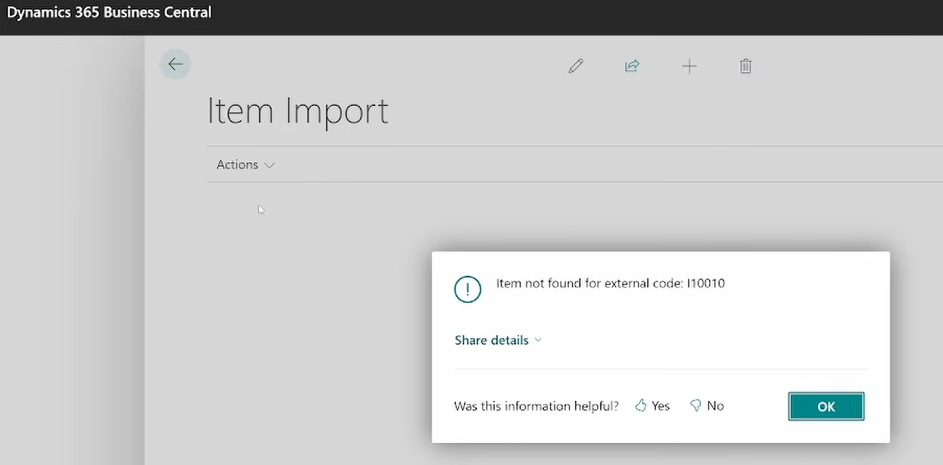
It fails with a message that the item is not found. Not much said, so let’s start the debugger as usual.
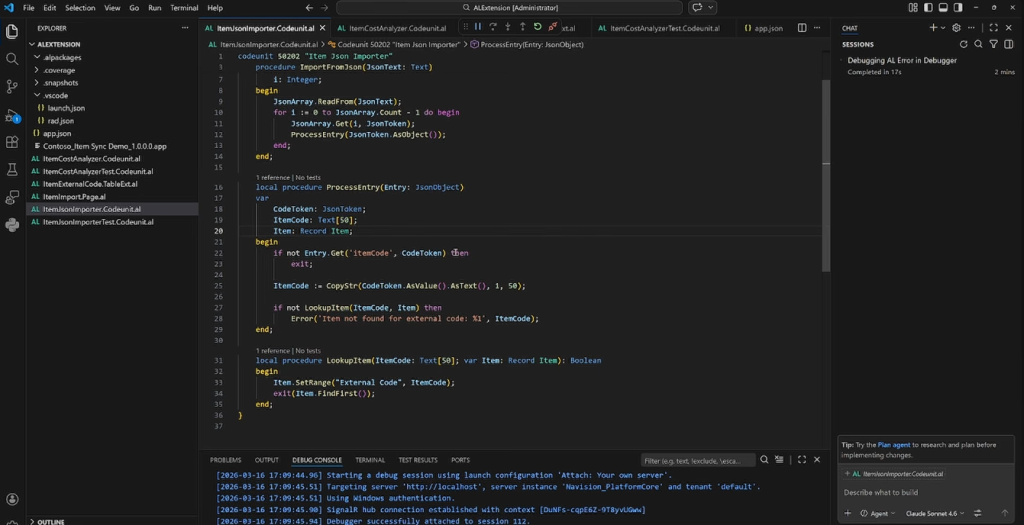
After executing again, it breaks on following:
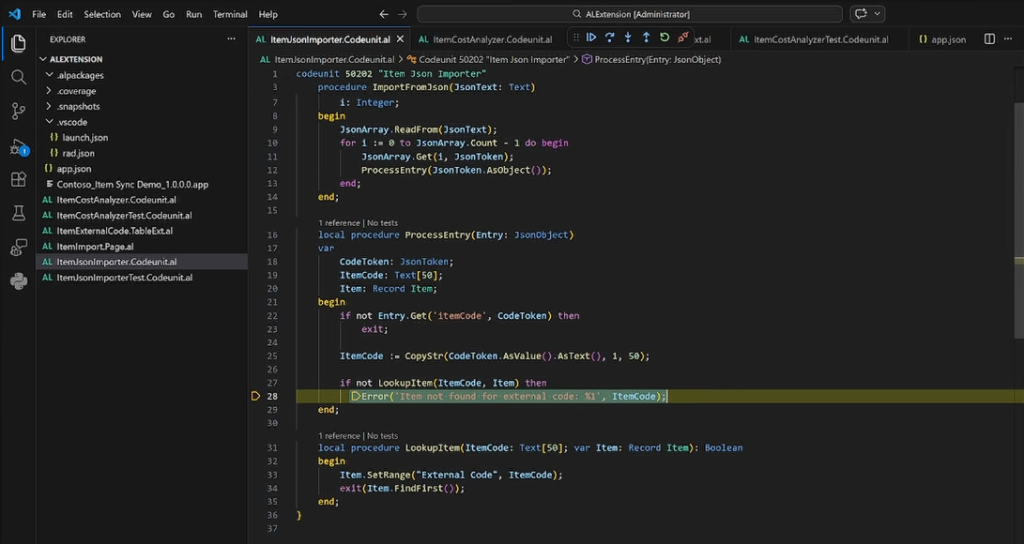
So, while debugger is active and stays on error, let’s ask Visual Studio Code Copilot if it can help us:
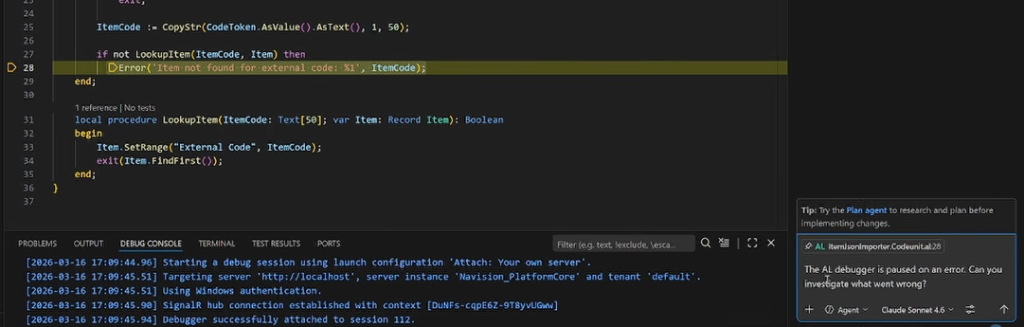
What MCP will do now:
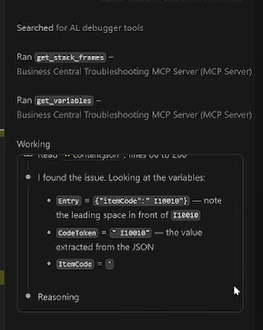
It will get_stack_frames and get_variables in current debugger session.
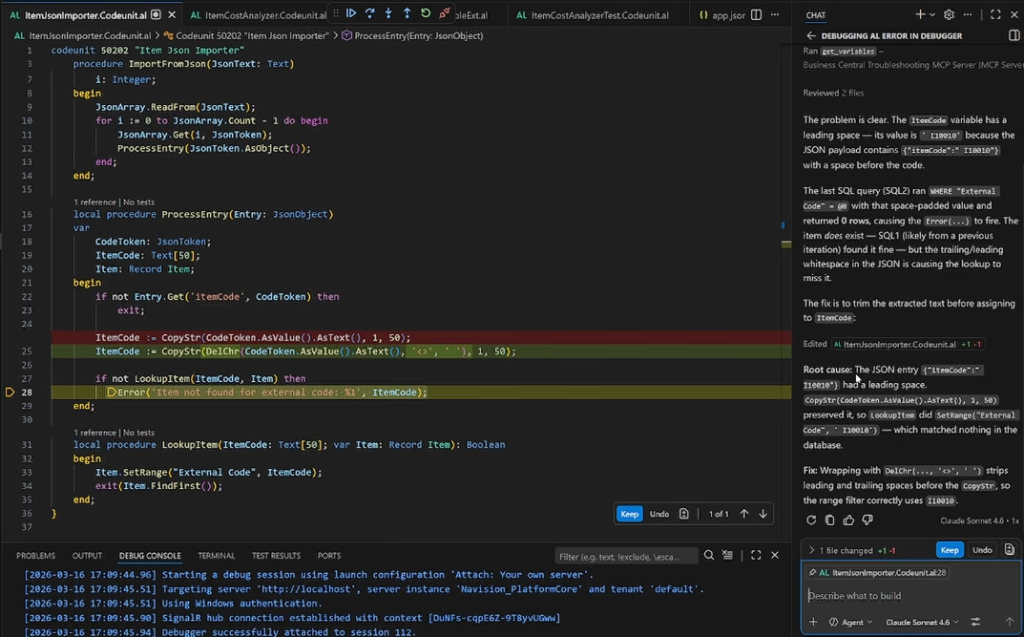
It has all the information now and can suggest the fix for the issue, and will also explain to you all what the issue was about.
What Copilot can do while the debugger is paused
The core idea is straightforward. Copilot attaches to the paused debugging session and uses the Business Central troubleshooting MCP server to inspect the running state.
That gives it access to the same kind of details a developer would normally inspect by hand, but now the process can be driven by prompts. During the demo, the server was described as exposing the debug runtime to GitHub Copilot.
The runtime context it can inspect
When you stop on a breakpoint or error, Copilot can work with several useful pieces of information:
- It can inspect the full call stack.
- It can read variables across stack frames.
- It can fetch the relevant AL source code for a given frame.
- It can help with breakpoints by object name or ID, type, and line number.
- It can reason across frames, such as checking how a variable changed from one frame to another.
That matters because most hard bugs are not isolated to one line. A wrong value often starts in one place, moves through a procedure or two, and only blows up later. Reading a single frame is not enough. You need the path the code took, the values it carried, and the place where things drifted off course.
This is also why the experience feels different from a chatbot bolted onto an editor. The answers come from a live execution context, not only from static code analysis. That is a major distinction.
Fixing unexpected JSON import errors faster
One demo showed a realistic failure during a JSON import flow. An external system sent a JSON file with item codes. Each entry was matched against the item table, and if an item was not found, the app raised an error.
The bug looked odd because the item did exist. The code seemed simple enough. One procedure imported entries from JSON, then another procedure processed each entry and looked up the item record. On the surface, nothing looked obviously broken.
That is the kind of bug that wastes time. You read the code, it looks fine, and yet the runtime says otherwise.
The debugging flow was refreshingly simple. The process was attached, the code was run again, and once execution broke, Copilot was asked to investigate what went wrong.
From there, the AL MCP Server for Debugging did the heavy lifting behind the scenes. Copilot inspected stack frames and variables, then found the real issue: the JSON item code contained a leading space. Because of that extra character, the lookup never matched the existing item.
That is a great example of why runtime-aware debugging helps so much. The problem was not a flawed business rule. It was dirty input data. You could stare at the source for a while and still miss it.
Copilot did not stop at diagnosis. It also suggested a fix. In the demo, the suggestion was to remove the offending entry character. A trim-based approach may also make sense in some cases, but the point of the example was clear. The tool found the cause and pointed toward a practical correction.
Why this example matters
This was more than a nice demo. It showed a pattern many AL developers know well:
- The code path is easy to understand.
- The failure looks wrong based on the business data.
- The root cause sits in a value you only notice at runtime.
The AL MCP Server for Debugging shines in exactly that scenario. It helps when the bug hides in data rather than in code structure.
Why this changes the day-to-day debugging workflow
The value here is not only that Copilot can answer questions. The value is that it answers them from the running context.
That changes the rhythm of debugging. Instead of spending your first ten minutes opening panes, clicking through frames, and checking variables one by one, you can start with a direct prompt such as:
- investigate what went wrong
- explain why this test is slow
- show the stack at a certain frame
- inspect variables across frames
The demo also highlighted that Copilot can help guide a debugging session by working with breakpoints. That is useful when the issue does not fail immediately or when you need to jump to a more meaningful stopping point.
For an AL developer, this means less time navigating tools and more time evaluating findings. The human role still matters. You decide whether the diagnosis is sound. You decide whether the proposed fix fits the design. You decide if the code should be changed at the source, at validation time, or at the integration boundary.
Still, the first pass gets much faster.
Where this fits in an AI-assisted AL workflow
This feature also lines up with the broader AI direction for AL development. The message from the release was not that AI replaces AL. It was the opposite. AL remains the source of truth, while AI helps you move faster through coding, troubleshooting, and maintenance.
The debugging MCP story fits that model well. Copilot is not the authority. It is the helper inside the debugging loop.
That distinction matters because debugging is full of judgment calls. A leading space in JSON data could mean trimming is safe, or it could mean the upstream system needs to be fixed. AI can point out the problem, but the developer still owns the decision.
The main takeaway for AL developers
The best part of the AL MCP Server for Debugging is that it helps with the bugs that are easy to misunderstand. Those are often the expensive ones. They are not broken because of a missing semicolon. They are broken because the runtime state tells a different story than the source code does.
This release shows a clear path forward for debugging in Business Central. Pause execution, ask a focused question, let Copilot inspect the live context, then verify the answer like any careful developer would.
That is a better loop than hunting through panes and hoping the right variable catches your eye.
If debugging has felt slower than it should, this is one of the most practical updates in the release. Start with the official debugging MCP server documentation, try it on a real bug, and see how often it helps you get to the root cause faster.
Related posts
The AL Performance MCP
AI (Claude and Copilot) · 8 Jul 2026

Using AI to Analyze Business Central Snapshots Debugs and Profiles
AI (Claude and Copilot) · 15 Feb 2026

Using AI to Enrich Web Shop Items in Business Central
AI (Claude and Copilot) · 1 Oct 2026
al graph: Auditing Who Can Reach Your Code in AL 18.0
Development · 24 Aug 2026