

Accessing BC Environment without GUID in URL
One short Friday Business Central tip!
Until some while ago, I have been accessing for a long time all Business Central environments by GUIDs in URL:

Even though some of you know how to access it differently, I saw that lot doesn’t know.
So, there is hidden gem in Business Central documentation under Delegated Administrator Access to Business Central Online.
Delegated admin access to Business Central online – Business Central | Microsoft Learn
Under all information given there, you can find tip section:
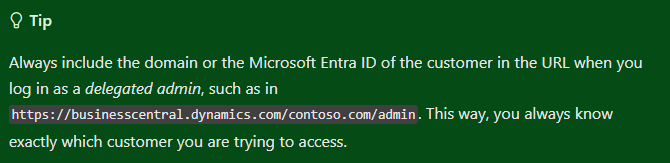
Meaning you could access your Business Central environment with domain name or Microsoft Entra ID:

Especially useful when having lot of customers under your Azure, and you go to /admin.
GUID’s are not meaning anything to you, but with domain name you after accessing those environments, you will eventually have suggested URL’s after typing https://businesscentral.dynamics.com/.
Enjoy the weekend! 🎉
Related posts

MB-800 Decoded: 24 Business Central Scenarios and the Reasoning Behind Each Answer
General · 30 Jul 2026
External File Storage Module for Document Attachments in Business Central
General · 27 Nov 2025
How to create new Sales/Purchase Price List lines with Edit in Excel
BC Learn · 20 May 2025

Setup notification when Job Queue fails, with BC or Power Automate
BC Learn · 2 Feb 2025